How do I log in to the ISS Payslip Portal? Employees of ISS get their payslips on every pay date. The ISS payslip digital report is available at (https://my.sdworx.com/portal), the payroll website. You should log in to get your latest pay report. There are several ways to log in:
- Log in using a QR code with passwordless authentication (mysdworx app).
- Log in with your email address and password (2-step authentication required).
- Log in with SSO (without any second-step authentication).
It’s my first day in ISS. How do I log in to the ISS Payslip Portal?
Let me guide you. Your employer gives you access to the MySDWorx payroll portal. You will receive an invitation via email.
- Open the received invitation and click on “Accept invitation”.
- Now, follow the on-screen instructions and select “create a new account.”
- Fill in all the required information to create your account.
- Use your personal email for your payslip account
- Now, follow the instructions to display on your system screen and be eligible for a 24/7 view of an updated report of weekly/ monthly payments.
An employee will not receive the invitation email under various conditions.
#If they already have an account
#If they already have access to the payslip portal
ISS Payslip Portal (https://my.sdworx.com/portal)
The ISS employee and employer are all logged in to the My SD Worx portal to understand and manage their e-payslip, personal document, and information.
Freshers of ISS, let’s know how easy to check the digital payslips on any smart mobile, laptop, tablet, etc. Through this article, I’m going to share the best-known method to access your payslip online without any errors.
What details are mentioned in your e-payslip?
A payslip holds the employee’s name, payslip date, gross pay, deductions, taxes, hours worked, net pay, etc. details.
How do I Log in to MySDWorx Portal?
ISS offers several ways to log in. Here I’m going to share all the ways to log in:
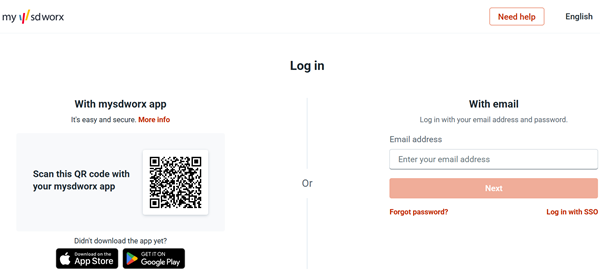
Log in with your email and password?
This process required two-factor authentication. If you’re ready for this, follow the given steps:
- Step 1. Go to https://my.sdworx.com/portal.
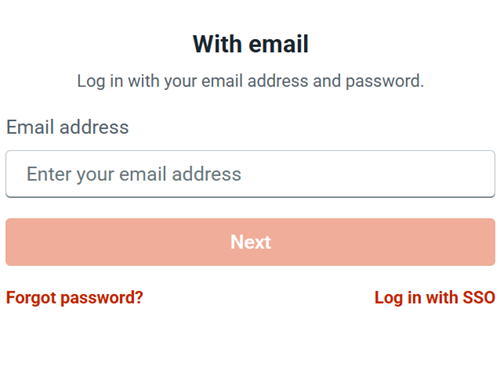
- Step 2. Enter your Email address and click on the Next button.
- Step 3. If the email account is associated with the account, you will be asked for the password in the next step. OR
- Step 4. You will see the message “There is no account associated with this email address“.
- Step 5. After entering the credentials successfully, you receive an authentication code via the app or a message.
- Step 6. Now, enter the received code and follow the instructions displayed on your system to access your account.
Log in with SSO
When you open the MySDWox login portal, you will see “Log in with SSO.” Click on that: Now the screen looks like:
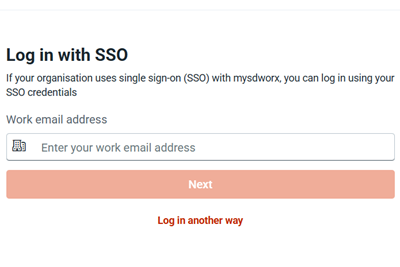
- Enter your work email address associated with the ISS account.
- Click on the Next button.
- It will fail if you enter the wrong email address.
- After the verification of your email, you will jump to the next verification step, which is password verification.
- Here, you don’t need a second authentication step.
Log in with MySDWorx App (Passwordless Authentication)
It is the safest login method for employees to access their HR functionality using their smartphone at any time or anywhere. First, you need to download the app from the App Store and Google Play Store.
How to Activate the App for Scanning the QR Code?
- Log in to the MySD Worx portal.
- Move the cursor to your name and click on that.
- Select “settings”.
- After that, click on the Security.
- Now, click the button to activate the mysdworx app for secure login.
After this process, you will be eligible to access your account passwordless by scanning the QR code visible on the login page.
About ISS
ISS stands for International Subcontracting Solutions, formed in 1934. ISS, a leading workplace experience and facility management organization, is a part of the BBC.
ISS provides its services across 30+ countries to over 60K+ customers. ISS focuses on adopting a moral approach to people, the planet, and profit.
It is a global company that currently works with more than 500000 employees. ISS plays the most effective and important role in solving the world’s most sustainable challenges.
FAQs
I want to ask something about my payslip. Is there a helpline to contact the payroll team?
Yes, you can ask via email. Compose an email and send it to OnlinePayslips@uk.issworld.com
Is the My SD Worx app available for Android phones?
Yes, it’s easy to download from the Google Play Store.
I have a tablet. Can the MySDWorx app be downloaded on it?
No, the tablet version is not available right now.
How can I request to stop receiving paper payslips?
Log in to the MySD Worx portal, open the My Salary section, and the option to choose digital delivery will appear the first time you access My Salary.
I want to receive a paper payslip. What should I do?
Contact your HR department.
I can’t log in. What to do?
Contact the SD Worx Support team via this online support form: https://my.sdworx.com/support/form.
Conclusion
The ISS payslip online login saves money and time, and increases the efficiency and accuracy of the workforce payment report. As we know, salary is the most important part of an employee’s life.
If you have started your employment journey in ISS, then go to the ISS Sdworx payroll web to access the report of your first and upcoming income.